

A thorough explanation of how to register with Discord, how to join a server, and how to use it!

Even if you have a group of oshikatsu friends, if you don't have a live performance or other opportunity, you won't have a place to watch videos on YouTube and talk about your oshi.💦😭
So, what I would like to recommend this time is"Discord"It is💓😎
You can gather on the server with your friends and communicate easily through voice chat and text chat.🔥📲
Voice channels don't make calls, so you can jump in when someone else is gathering.🙄💡
In this article,Explaining how to create a Discord account and basic usageI will🔊🎓
There is a possibility that it will become a mainstream communication app in the Oshikatsu market in the future, so please take this opportunity to check it out.✅Please try it🎶🤗
In addition, we have received many Oshi advertisements®︎(Birthday/Support Advertisement) I received a request🪄
What is Oshi Advertising®︎?"Advertisement for fans to support their favorites"It is✨🥹
We have a support system in place that allows even those who are trying out Oshii Advertising®︎ for the first time to tackle it with peace of mind, so we will suggest advertising media that fits your budget.💰
If you are unsure of which advertising medium to use,We also offer free consultations on LINE, so please register as a friend and feel free to contact us.💓☝️


What is Discord?

DiscordHaFree community app available in over 30 languagesYou can make text chats, voice calls, video chats, etc.😍
Since the first version of the American service was released in 2015, the number of users has been increasing at an amazing speed.☝️
Initially, it was designed and developed as an app to resolve disagreements in the gaming community.In 2020, the slogan was changed to “Your place to talk”and is now used for many purposes, not just gamers.👀🎶
Communicate with your friends on Discord!
Discord allows you to use multiple functions on one platform, soCommunication not only for individuals but also for group activities and within companiessuitable for💻💡
Packed with useful functions for communicating with friends 🤗
- [Communication function]
✅Text chat: create threads, pin, use emojis and GIFs
✅Voice calls: noise canceling, low latency function
✅Video call/screen sharing - [Community management]
✅The server is invitation-only to ensure safety.
✅Customize to suit your needs, such as text channels and voice channels - [Share and distribute the game screen]
✅Screen sharing: Share your gameplay in real time
✅Streaming function: Limited distribution with members within the server is possible.
✅Overlay function: Check notifications and chat on the screen while playing the game
If you are interested, it is a good idea to create an account as you can communicate smoothly with friends connected through Oshikatsu and watch music videos and live streaming.😋🪄
I will explain how to create an account later.✨📲
Why Discord is supported
Discord has continued to expand its share since its release in 2015, and the reason behind this is"Multifunctionality" "Customizability" "Lightness of operation"There is a characteristic that 🧸🫧
It has been used in a wide range of situations, including remote work, education, hobbies, and community activation.
Here are five reasons why Discord is more popular than other companies' tools such as LINE, Skype, and Zoom.💓
- There is a "server" function that strengthens group management.
- You can use high-quality voice and calling functions for free.
- Full of features for gamers
- Has BOT functionality and automation
- Can be flexibly customized according to the purpose of use
Also,Compatible with Windows/macOS/Android/iOS/Linux/BrowsersBecause of this, it is also attractive that you can use different devices depending on the situation.🔥😎
Explanation of commonly used words in Discord

I will explain the words commonly used in Discord 🤩💕
There are some words that you may not be familiar with, so reading them beforehand will help you proceed smoothly from creating an account to communicating with friends after registration.🎶
server
The biggest feature of Discord isYou can freely customize the community space called "server"That's it.🙄💖
Within the server, participants can connect in real time using text chat, voice chat, screen sharing features, etc.🙌
Participation in the server is only possible through an invitation link, so setting an expiration date and number of uses can prevent unspecified large numbers of people from participating and ensure safety.☝️👀
channel
To have conversations or other exchanges on Discord, you need to create a server or be invited to join.💁♀️
The server is a community, and you can communicate with members by creating channels within it.🙌🤗
Channels can post and share text messages and images“Text Channel”You can make voice and video calls and share your screen with“Voice Channel”There are two types of 🥰
Both allow you to create multiple channels, so if you have channels for each topic, you can handle it even if the number of servers increases.✨
You can also set up a private channel to limit visibility to specific members.😘💫
roll
What is a roll?Permissions and roles within a server or channel given to specific membersIt is💖
There is a set priority, and even if you set multiple roles, the priority will change depending on where you set the role authority or whether you set it for each member 🤔
| the best | |
| ↑ | Role with administrator privileges |
| ↑ | Permission settings for each member from the channel |
| ↑ | Permission settings by role from channel |
| ↑ | Permission settings from channel |
| ↑ | Permission settings for each member from category |
| ↑ | Permission settings by role from category |
| ↑ | Permission settings from category |
| ↑ | Permission settings for each member from the server |
| ↑ | Permission settings by role from the server |
| ↑ | Permission settings from the server |
| low |
BOT
What is BOT?Programs that extend or add functionality to your serverIt is🙄🎶
By introducing BOT, you can automate server operation, and there are various bots such as automatic message sending to new members, music playback, voting functions, etc.🙌
LINE and Zoom do not have such advanced customization features, so they are differentiated.🔥✨
How to create a Discord account

First, let's create a Discord account✨🥰
You can also use Discord in the browser version, butOfficial websiteWe recommend that you install and log in to the desktop or smartphone version of the app that is compatible with your PC.☝️
Do I need to create an account? Select "Register" on the right side of


Check [I am a human]✅After entering the image and completing the image, registration is complete.


*Creating a Discord server will be put on hold for now [✕] Select

How to set up your profile

Once you have created your account, you can set up your profile 🥰💡
On Discord"User Profile"and"Server Profile"It is possible to set💓
To edit your profile on the PC version, go to "User Settings" → "Profile"☝️
If you want to edit it on the smartphone version, tap the "You" icon at the bottom right and select "Edit Profile".📲
If you want to change the nickname for each server, edit the server profile.👀✏️
◆Profile items and details
| Item | Details |
| Display name | Change the name displayed in DM and server |
| pronoun | Add your own pronouns (He, She, Her, etc.) |
| avatar | Change profile picture |
| avatar decoration | Change avatar frame |
| profile effect | Change profile effects |
| banner color | Change profile banner color |
| Self-introduction | Set the self-introduction text for your profile |
| Add status | Current status can be set as emoji or text Change online status |
◆Server profile items and details
| Item | Details |
| Select server | Select the server whose profile you want to change |
| server nickname | Change nickname for each server |
| pronoun | Add your own pronouns per server |
| Add status | Set the current status of each server with emojis and text Changing online status per server |
*Separately, there are profile items that can be changed after joining Nitro.🙌
How to use Discord

It's hard to learn how to use a new app...😭I think there are many people who say💦
On Discord9 points: “If you can do this, you can enjoy communicating with your friends!”Introducing💘🥹
How to add friends
When we become friendsInvite to serverYa,Users can communicate with each other without going through a serverbecomes😘💡
Also, depending on your settings, you may be set to accept "friends only" direct messages.🔥
Click here to learn how to add friends👀
Click [Send Friend Request]
*It is not possible to search by user name or display suggestions, so it is important to enter the correct user name.


How to find and join a server
A server is an invitation-only community, similar to a "group".☝️✨
Popularly used by gaming communities and can be customized by adding per-server rules and Discord Apps😎
We will explain how to join the server, so if you are a beginner, check it out.✅Please try it💕
You can participate by simply clicking [Participate]
*Some servers have their own rules, so check if there are any channels you should watch.✅The point is to
Click [Add Server], paste the invitation link, and click [Join Server].

How to use text channels
Text channels, as the name suggests, areSpace for text conversationsIt is🪄🧸
You can create channels for each topic you want to discuss within your group.😎
Open the server where you want to create a channel, tap "..." next to the server name, select "Create channel", and select the text✨☝️
Inside the channel, it's very easy as you just enter what you want to talk about and send it, just like on LINE.😘
If you want to send a message to a specific person, press and hold the person's icon and mention them (@username) before sending the message.💁♀️
How to use voice channels
The voice channelSpace for audio and video conversationsIt is🎶🙄
Click into a voice channel to join the conversation instead of letting your phone ring🙌
Friends on the server can see who is in the voice channelso you can jump in and join conversations and share your screen.💖
For example, you can enjoy chatting with fellow gamers while broadcasting your gameplay 🥰
How to do voice chat
Introducing how to use voice chat✨😘
*For the desktop version, it is displayed at the bottom left of the server.
By opening the audio/video settings from the user settings, you can change the audio input, input sensitivity, etc.
How to video chat
Introducing how to video chat💡💓
*If you want to stop, press the video button again.
*For the desktop version, it is displayed at the bottom left of the server.
You can set input devices by opening audio/video settings from user settings.
How to share your screen
Introducing how to share your screen🎥
While your smartphone is on the voice chat screen, swipe up on the white bar at the bottom.
How to watch YouTube together
If you use “Watch Together”Multiple people can watch YouTube at the same time on the voice channelYou can🎥💓
This is a revolutionary feature that allows you to enjoy movies and videos while having conversations with friends and fellow enthusiasts who are far away.😍
*A role that allows you to use activities is required.
Select "Watch Together" from the displayed activities
*You will be asked for some authentication, so allow it.
Click [Expand Video] to watch the video on a large screen.
How to send a direct message
You can send direct messages to your friends within Discord.📩🍂

in direct messageYou can share files, give Nitro gifts, and send GIFs, stamps, and emojis.It is🙄🎶
Friends are displayed under "Direct Messages" on the top screen🙌🙆♀️
Just tap the friend you want to send a message to.🌷🩷
*Nitro is a Discord subscription membership plan.☝️
Available with Nitro or Nitro Basic plans, which offer custom emojis and stickers, HD video streaming, and more.🙌
Click here for detailsPlease check from💓👀
Summary
This time, we introduced the reasons why Discord is supported, explanations of frequently used words, and how to create an account.😘🙌
Multiple functions can be used on one platform, and it is gaining popularity as a tool to enhance communication within individuals, groups, and companies 🧸🪄
Since its release in 2015, it has continued to expand its market share with its appeal of ``multifunctionality,'' ``customizability,'' and ``lightness of operation.''🎶
There may be more opportunities to use it in the future, such as a place to socialize after Oshikatsu events 🤗
If you would like to expand your circle of friends, please register for an account.💘🥹
BirthdayLeave it to JAPAN!

After reading this article, I thought, ``Oshi advertising (Birthday/I want to run a support advertisement)! Many people may have felt that💞😊
「I don't have the courage to advertise...」「Isn't the procedure difficult?” If you are worried, please tryBirthdayPlease feel free to contact JAPAN ^^
BirthdayWhen you register for JAPAN's official LINE,Auto-response chat will solve your problems regarding support advertisements!
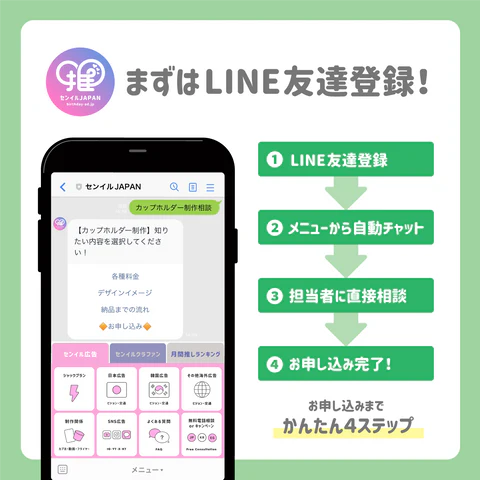
You can feel safe by chatting with our staff or by phone.♪
From consultation to media arrangement to design production to advertising implementation reportYou can complete it with just LINE!
First of all, please try registering as a LINE friend ^^
★BirthdayJAPAN SNS information★
BirthdayIn JAPAN, “X」「Instagram」「TikTokWe are also distributing SNS on ``♪
Birthday/Not only information on support advertisements, but also information on actors and idols, and great deals, so please be sure to follow us ^^
X (@birthday_ad_jp)
「BirthdayI want to get information about JAPAN as soon as possible!”, please follow X♪
Make dreams come true...! #crowdfunding Thorough explanation of the mechanism from the beginning 🫡
— BirthdayJAPAN (@birthday_ad_jp) October 9, 2024
We will introduce 5 recommended crowdfunding sites based on our track record.❤️
Birthday/Our company specializing in support advertising #BirthdayClafan Don't miss out on✍️https://t.co/ze37sUzoWx
In X, theBirthday/We will quickly send you information about support advertisements and blogs about idols, actors, etc. that we update every week ^^
We also distribute campaign information, so don't miss it!
Instagram (@birthday.ad.jp)
「I want to get information in an easy-to-understand manner with images!”, please follow us on Instagram!
On Instagram, we provide easy-to-understand images of key points from blogs about actors and idols that we publish every week.♪
carried outBirthday/ We also introduce support advertisements, so if you are considering it, please refer to it!
You can "save" your favorite posts and revisit them anytime ^^
TikTok (@birthday.ad.jp)
「Focus on saving time! I want to get information quickly through videos!”, we recommend following you on TikTok♪
@birthday.ad.jp This is our thoughts on our promotion.😄I'm looking forward to connecting with everyone who has the same thoughts!#Oshikatsu #KPOP #Otakatsu #BirthdayAdvertisement #Birthdayadvertising agency japan #Korea #Japan #Korea information ♬ POP! - NAYEON
On TikTok,Birthday/We explain information about support advertisements and blog information in an easy-to-understand manner with videos ^^
It's a short video, so you can watch it in your morning time.♪
We plan to continue disseminating various information through SNS!
Please follow us so you don't miss out on the latest information ^^