

[How to use DuckAD] Explain how to voting for Sumin, how to collect voting tickets, and language settings!

Do you know about the app "DuckAD" that can contribute to the number of plays of your favorite songs?
"DuckAD" uses the accumulated voting tickets to
Korean music distribution sites “Melon”, “Genie”, “Bugs”An app that can contribute to the number of playbacks of audio sources in🎵
Furthermore,YouTube MV, Spotify streaming playback countYou can also extend🌟
“Since Oshi made a comeback, I want to do my best with Sumin.😌🙌」
“I want Oshi to win first place!!”
This is one of the essential apps for fans of🏆✨
If you master DuckAD,You can contribute to Oshii's sound source performance, you can publish Oshii Advertisements® (support advertisements),You can support your support in various ways!
So this time,Information as of February 2025Based on
How to vote Sumin using DuckAD and how to collect voting tickets,
FurthermoreBasic usage such as how to register, language settings, how to change profile photo, etc.
I will thoroughly explain♪
After reading this article,I want to support more activities!」「Personally, I would like to put out a support advertisement!If you think this is the case, please feel free to contact us⭐
At our company, recommended advertising (Birthday/support advertisement)💡
「I'm interested in advertising, but I don't know how to put it out...」「I'm concerned about the cost...”, we also offer free consultation on LINE, so please register as a friend first.♪


What is DuckAD?

Apps that can contribute to Korean streaming
What is DuckAD?An app that allows you to use the voting tickets you have saved to increase the number of plays of your favorite songs.about♡
Korean music distribution site where it is difficult to register an account from Japan
- Melon
- Genie
- Bugs
InNumber of streaming views (Sumin)can contribute to✅
In addition, you can watch the MV of Sumin on YouTube, and if you are a Spotify Premium member, you can also upload Sumin on Spotify.
When it comes time for a K-pop group to make a comeback, many fan bases and fan accounts
"Let's do our best, Sumin!" "Thank you for your cooperation!"
A call is made such as👀
The main purpose of these calls is toTo increase the number of streaming plays of a song and improve the performance of that song on the music chart.💡
Meanwhile, DuckAD, which we will introduce this time,One of the representative apps that can contribute to Suminhas become❕
By using DuckAD, you can
Increase the number of plays on Korean music distribution sites “Melon”, “Genie”, and “Bugs”
In this way, you can support the sound source performance of your favorite new song.🌱✨
If you want to know more about music distribution sites "Melon", "Genie", and "Bugs", please check out this article.🎵
What you can do with DuckAD

"Sumin" is not the only thing you can do with DuckAD💡
You can mainly use the following four functions.✅
- streaming voting
- Popularity vote
- Best idol group trophy vote
- open voting
Let's check each one in detail.❕✨
Streaming voting: Contribute to sound source results!
#덕애드 [🎁[Important]
— DuckAd (@duckad2020) February 5, 2025
🎧 NiziU (니쥬) 1st Mini Album
[AWAKE] - 『YOAKE』
✨I want to know, I want to see you, I want to see you❗
✨DUCKAD users play your music on your behalf❗
Spotify, Spotify, Spotify pic.twitter.com/whwCbNKzJu
The first feature we will introduce is "Streaming Voting".📝
Streaming voting is where you use the "voting tickets" you have collected to vote for the songs you want to support.🎧
When voting,Specify the number of streaming plays and the site you want it to reflect.I will✅
Then, the voting content will be reflected in the number of streaming views through DuckAD.💿✨
Especially“Melon,” “Genie,” and “Bugs” each create their own music charts based on the number of streams and downloads.I am doing❕
Therefore,The number of streaming plays on music distribution sites has a significant impact on K-POP artists' "sound source performance"📝
Streaming voting on DuckAD contributes to the recommended sound source performance, so it can be said that it is a function that you will want to actively utilize.✊✨
Popularity vote: Favorite advertisement present!
#덕애드 📢1 page
— DuckAd (@duckad2020) January 31, 2025
🥇1 song #이병찬 MEGABOX🏆
+영화 상영 직전 영상 광고
🥈2위 #박장현 1 year ago
🥉3위 #천준혁 CM 14
+(1위~3위)🎁
▷400 yen (CM 14 yen)🎁#펭수… pic.twitter.com/yQDtymPJSW
The second feature we will introduce is "Popularity Vote".📝
DuckAD holds a monthly "Popularity Vote"👑
Depending on the final result, various promotion advertisement (support advertisement) benefits are available.🎵
Best Idol Group Trophy Vote: Trophy Presentation + Favorite Advertisement Presentation!
🏆2 What are you waiting for?
— DuckAd (@duckad2020) January 21, 2025
[Best Idol Group Trophy of The Month, February]
🎖️주관 : 스포츠투데이
🗂️투표 부문 : 남자 아이돌 그룹, 여자 아이돌 그룹
🗓️투표 기간 : 01월 22일 ~ 02월 21일
📲Home : #덕애드 DUCKAD APP
📢1999 발행된 대한민국… pic.twitter.com/80jznyyTHK
The third feature we will introduce is "Best Idol Group Trophy Voting"📝
For winning 1st place, a real trophy will be presented directly to the artist🏆🌟
Additionally, you will receive a large electronic billboard advertisement in New York Times Square as a bonus.🎵
Open voting: Favorite advertisement present!
#덕애드 [ILLIT] ILLIT📢]
— DuckAd (@duckad2020) December 16, 2024
🗓️기간 : 12 월 16 일~목표 투표수 달성까지
🎁Home: Home / Business
🎟️투표하러가기(오픈투표->더보기->최신순)#아일릿 #ILLIT
🔻It's a good idea🔻
iOS▶️https://t.co/BV0jdT8jek◀️
Android▶️https://t.co/v6wblpxgFh◀️… pic.twitter.com/nxYTN5tQiw
The last feature we will introduce is "Open Voting".📝
Open voting is a voting held at the request of fans!
If fans cooperate with each other and reach the target number of votes within the period, they will receive a recommended advertisement.🎁💓
DuckAD language settings

Among those who started using DuckAD,
"I don't know how to change from Korean to Japanese.💦」
As you can see, many people seem to have trouble setting the language.😭
To use the app without stress,We will show you how to set DuckAD's language to "Japanese"💌
How to make it into Japanese
Actually, there is no language setting function within DuckAD.👀
To change the notation in the app to Japanese,
Set the language setting of the device to "Japanese"
need✊✨
The setting method varies depending on the type of device you are using, but
Find the language setting screen from "Settings" on the device itself and set the language setting of the device itself to "Japanese".✅

In addition, even if you change the language setting to "Japanese", as shown in the screenshot above,Banner images and headingsSome parts will remain in Korean, such as❕
How to register DuckAD
Here we will briefly introduce how to register for DuckAD.👇💓
① Download the app
First, download the app to your smartphone.✨
The images introduced in this article are from when registered on Android.

Once downloaded, it will be available at the top of the top page.
"Please log in."
Tap👀
② Log in

- ⭐Apple account (displayed for iOS)💁♀️)
- ⭐Google Account
- ⭐Kakao account
Tap on the one you like and log in ⭐
③ Agree to terms and set date of birth

"Terms of Service and Personal Information Handling Policy"When you proceed to the screen,
- ⭐Personal information handling policy
- ⭐Terms of Service
- ⭐Consent for personal information collection and use
Check eachTap the "Agree" check button✅I will📝
Also select "Date of Birth" at the bottomLet's do it!(From the left column: Year of birth (Western calendar) / Month of birth / Day of birth)
Finally, tap the "Agree" button to complete your DuckAD membership registration.🎀
How to change your profile picture
Next,How to change your profile photo (icon)It's about✅
Recently,"I tried to change my profile picture, but I couldn't...😢」Many people say that 🥺
Apparently, even if I try to change it from the DuckAD account management screen, I keep getting an error that prevents me from registering photos.👀
So from here,Two methods to try if you are having trouble changing your profile pictureI would like to introduce you to💌
- ⭐First one⭐
- Change the profile picture of your Apple account/Google account/Kakao account
The first method is"How to change the profile picture of the account used to log in"It is💡
When you log in to DuckAD, you select either "Apple Account / Google Account / Kakao Account", right?
I chose at that timeChange the profile picture of "Apple account / Google account / Kakao account" itselfThen, it will be easier to reflect on the DuckAD icon after a few days ◎
If it doesn't change after a few days,
Try logging out of DuckAD and logging in again.
There are cases where this is reflected, so please try it.✌✨
- ⭐Second⭐
- Connect to a VPN and change your profile picture within the app
The second method is"How to connect to a VPN and change your profile picture within the app"It is🌱
Here we will introduce the steps.💌
① Connect to VPN
Connect to a VPN using a VPN app or service✅
- 📝What is a VPN app?
- A VPN is a virtual private network created on top of your regular internet connection.✅
- Connecting to the Internet using a VPN is called "connecting to a VPN," and a "VPN app" makes it easy to do this.💁♀️
- For example, if you use a VPN app, you will be able to watch videos that cannot be accessed from Japan (such as YouTube content that is displayed as "Not available in your area").📺
There are many VPN apps available, both free and paid.📝
However, especially with free VPN apps,
Low safety, security concerns, low reliability, etc.
You need to be careful as there are various possible risks.⚠
Please use your own discretion when using VPN apps.🙇♀️
② Move to the account management screen

Where the account name is displayed at the top left of the top pageTap to go to the "Account Management Screen"✅

Or,Tap the "3" button on the top left of the top page, and click the gear "3" to the left of the account name.⚙” buttonTap!
This method also allows you to move to the "Account Management Screen"🙆♀️
③ Tap “Profile photo”

In the "Account Management Screen",Tap the "Change" button on the right side of "Profile photo"I will✅
④Select an image

Select "Photograph" or "Album" and select the image you want to use as your profile picture to complete changing your profile picture.📷
How to collect DuckAD voting tickets

DuckAD's "streaming voting" requires 500 voting tickets each time.❕
voting ticketValidity is 90 daysSo be careful!
From here,Introducing how to collect DuckAD voting tickets💌
Tap +20 VOTE

bottom right of the top page,"+20 VOTE" buttonTap🙆♀️
You can get voting tickets after watching the advertisement◎
Confirming attendance/What to do if you are unable to attend
① Tap “TICKET” from the menu at the bottom of the top page

② Tap the blue banner displayed at the top to get a voting ticket

What if I can't attend?
If you are unable to attend,Change the "Settings" of your deviceI will.
Allow "tracking" from your device's settings screen😊
Read article
① Tap “TICKET” from the menu at the bottom of the top page
② Tap the article you want to view from the “Read articles and get voting tickets” menu
③ Scroll to the bottom of the article and wait a few seconds to get your voting ticket.
Tap on banner ad type
① Tap “TICKET” from the menu at the bottom of the top page
② Tap the banner in the "Banner ad type" column to get voting tickets.

Watch advertisements with advertisement video viewing type
① Tap “TICKET” from the menu at the bottom of the top page
②Watch videos in the “Advertisement Video Viewing Type” column and get voting tickets.

Watch ads with video ad type
① Tap “TICKET” from the menu at the bottom of the top page
② Tap the banner in the “Video Ad Type” column to watch the video and earn voting tickets.

Questionnaire answers
① Tap “TICKET” from the menu at the bottom of the top page
② Tap the image in the "Get vts" column, answer the survey, and get voting tickets.

mission
① Tap “TICKET” from the menu at the bottom of the top page
②Tap the A/B/C/D mission banners to challenge the mission and earn voting tickets.

Purchase voting ticket (charge)
① Tap “Ticker Box” at the top of the top page

②Tap “Purchase” at the top of the new screen

③ Tap the “Purchase” button for the plan you want to purchase and purchase the voting ticket.

As of February 2025, there are 3 plans available◎
- 🌟3,000 voting tickets +α
- 🌟30,000 voting tickets +α
- 🌟300,000 voting tickets +α
Recommender settings
If someone you know is already using DuckAD,If you register that ID as a recommender, you can both get voting tickets (person who recommended: 20 voting tickets, person who was recommended: 50 voting tickets)😌🙌
① Tap the "3" button on the top left of the top page, then tap the "Recommender" button in the side menu

②Enter the recommender's ID at the bottom of the new screen to obtain a voting ticket.

How to vote streaming on DuckAD
From here,DuckAD's "Streaming Voting" methodI would like to introduce you to💌
Remember how to vote and contribute to your favorite Sumin✊✨
Collect 500 voting tickets (1 play)
The number of voting tickets required to play Sumin once is "500"!
Once you have decided on your favorite comeback, let's collect voting tickets through the methods introduced earlier, such as attending, watching video ads, and viewing banner ads.✨
The validity period of the voting ticket is "90 days"So be careful not to forget to use it.👀🙏
Apply for a song
If the song you want to vote for doesn't come up when you search, you need to apply for a song.💌
If 10 or more people apply for a song within 30 days, it will be reviewed, and if it passes the review, it will be registered on DuckAD within a week.💡
① Tap “STREAMING” at the bottom of the top page

②Tap the "Apply" button on the top right of the screen

③Enter the song title/singer name and tap the "Apply" button.

vote
Once the song is registered on DuckAD, use the voting ticket to sumin it.🎧🌟
① Tap “STREAMING” at the bottom of the top page
② Search for the song you want to vote for in the search field and select the song

③ Select “Number of Sumin” and “Music distribution site you want to vote on” and tap the “Sponsor” button

In most cases, there will be a call for the music distribution site to vote for within each fandom's X, so please refer to it (*¨*)♡
Summary
This time, we thoroughly explained how to use "DuckAD"✊✨
If you do your best in streaming voting on DuckAD, you will improve your favorite sound source results!
In addition, if fans cooperate with each other to vote, they will be able to receive trophies as a bonus, and they will be able to run promotional advertisements.💓
``DuckAD'' can also contribute to Sumin, a Korean music distribution site where it is difficult to create an account from Japan.❕
Take this opportunity to master how to use it, and we will give you the number 1 spot on the music chart and support advertisements.🎁✨
BirthdayLeave it to JAPAN!
After reading this article, I thought, ``I am also a recommended advertisement (Birthday / I want to run a support advertisement! Many people may have felt that♪
「I don't have the courage to advertise...」「Isn't the procedure difficult?” If you are worried, please tryBirthdayPlease feel free to contact JAPAN ^^
BirthdayWhen you register for JAPAN's official LINE,Auto-response chat will solve your problems regarding support advertisements!
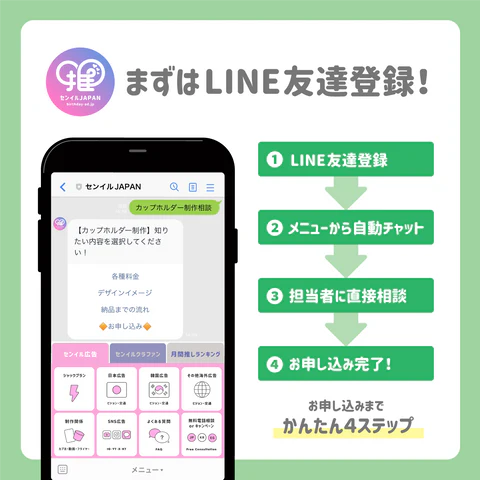
You can feel safe by chatting with our staff or by phone.♪
From consultation to media arrangement to design production to advertising implementation reportYou can complete it with just LINE!
First of all, please try registering as a LINE friend ^^
★BirthdayJAPAN SNS information★
BirthdayIn JAPAN, “X」「Instagram」「TikTokWe are also distributing SNS on ``♪
Birthday/Not only information on support advertisements, but also information on actors and idols, and great deals, so please be sure to follow us ^^
X (@birthday_ad_jp)
「BirthdayI want to get information about JAPAN as soon as possible!”, please follow X♪
Make dreams come true...! #crowdfunding Thorough explanation of the mechanism from the beginning 🫡
— BirthdayJAPAN (@birthday_ad_jp) October 9, 2024
We will introduce 5 recommended crowdfunding sites based on our track record.❤️
Birthday/Our company specializing in support advertising #BirthdayClafan Don't miss out on✍️https://t.co/ze37sUzoWx
In X, theBirthday/We will quickly send you information about support advertisements and blogs about idols, actors, etc. that we update every week ^^
We also distribute campaign information, so don't miss it!
Instagram (@birthday.ad.jp)
「I want to get information in an easy-to-understand manner with images!”, please follow us on Instagram!
On Instagram, we provide easy-to-understand images of key points from blogs about actors and idols that we publish every week.♪
carried outBirthday/ We also introduce support advertisements, so if you are considering it, please refer to it!
You can "save" your favorite posts and revisit them anytime ^^
TikTok (@birthday.ad.jp)
「Focus on saving time! I want to get information quickly through videos!”, we recommend following you on TikTok♪
@birthday.ad.jp This is our thoughts on our promotion.😄I'm looking forward to connecting with everyone who has the same thoughts!#Oshikatsu #KPOP #Otakatsu #BirthdayAdvertisement #Birthdayadvertising agency japan #Korea #Japan #Korea information ♬ POP! - NAYEON
On TikTok,Birthday/We explain information about support advertisements and blog information in an easy-to-understand manner with videos ^^
It's a short video, so you can watch it in your morning time.♪
We plan to continue disseminating various information through SNS!
Please follow us so you don't miss out on the latest information ^^